



What makes one prompt more effective than another? In production, the answer is not vibes. It is whether you can measure the difference, compare versions, and explain the result to the people who have to ship it. Prompt evaluations are the discipline of scoring prompt outputs against a rubric so you can spot regressions, compare variants, and ship changes with fewer surprises.
Why Are Prompt Evaluations Important?
Prompt evaluations help identify and quantify the impact of even small revisions to your prompts, allowing you to fine-tune them to achieve the desired outcomes. Maybe you already have a "gut feeling" about which of your prompts works the best, but how do you know it works the best? Do the data really corroborate that? Have you tested across a large enough sample size? Have you stress tested? If potential investors in your AI product asked you for performance metrics, could you provide those?
Prompt evaluations are particularly important for:
- Improving accuracy: Ensuring responses are factually correct and relevant.
- Enhancing user experience: Aligning AI behavior with user expectations.
- Reducing hallucinations: Minimizing instances where the AI generates false or misleading information.
- Optimizing workflows: Streamlining tasks like content generation, data extraction, or customer support.
How Do Prompt Evaluations Work?
Step 1: Define Clear Goals
Before diving into evaluations, define what success looks like. What do you want your app or chatbot to be able to do, exactly? Should it be more creative or factual? More detailed or concise?
Step 2: Develop a Rubric
Create a framework for assessing prompt effectiveness. Your rubric might include criteria like:
- Relevance: Does the response directly address the prompt?
- Clarity: Is the response easy to understand?
- Consistency: Are similar prompts producing similar outputs?
- Accuracy: Are facts and data presented correctly?
Step 3: Test Prompts
Use a variety of test cases to evaluate how the model responds. Include:
- Edge cases: Uncommon scenarios or ambiguous phrasing.
- Average cases: Common, straightforward user inputs.
- Stress tests: High-complexity user inputs that push the model’s limits.
Step 4: Analyze Results
This is where prompt evaluation turns into a real workflow instead of a spreadsheet exercise. With PromptLayer, you can version prompts, run backtests on real examples, log outputs, and score each result with a rubric that matches your product. That means a PM, subject-matter expert, or engineer can look at the same prompt change and see the same evidence.
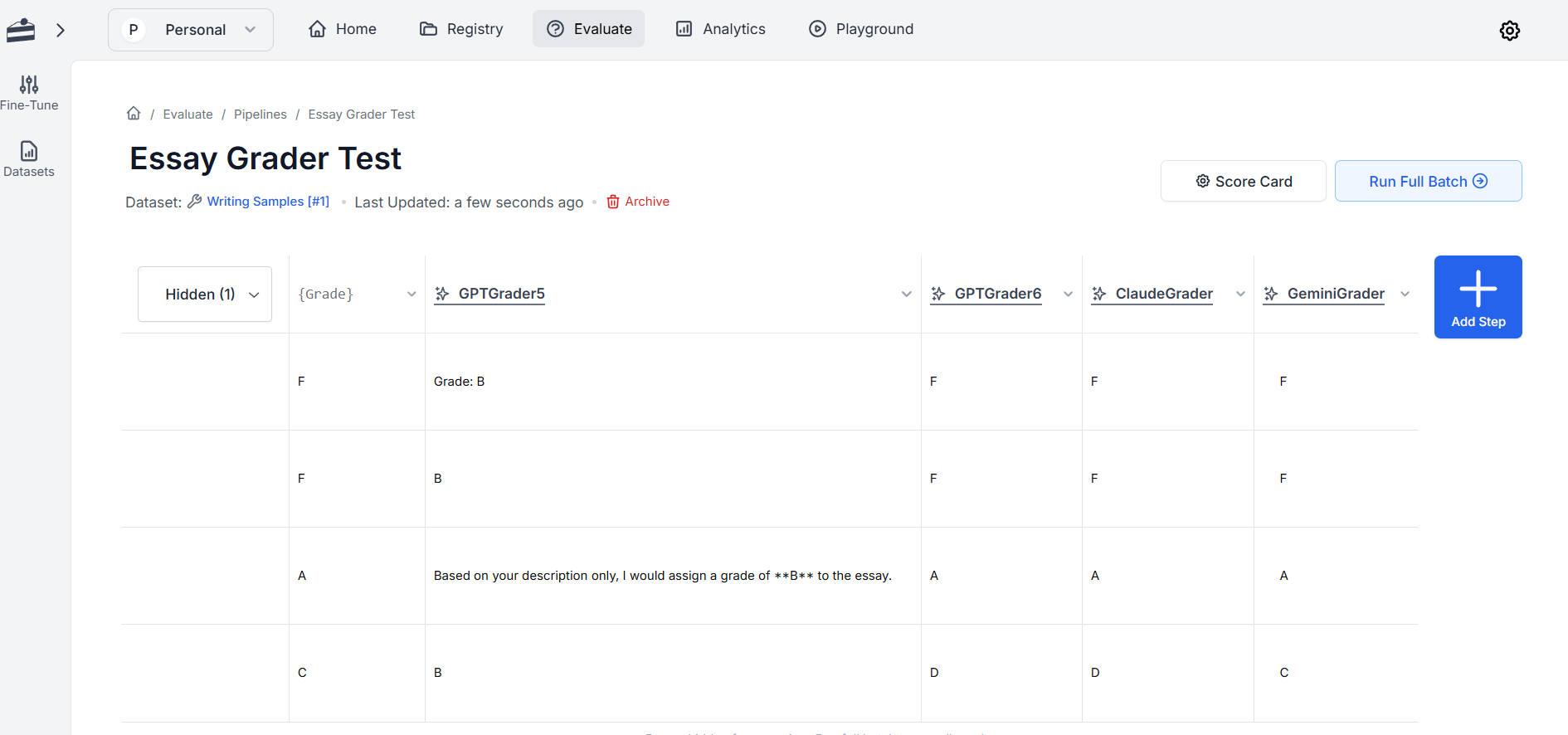
In the essay grader example below, the question was simple: did the grader give the same grade to the writing sample that I did? I tested different versions of the prompt on the same model and across different models, then used the results to decide which version was ready to ship. That is the real point of prompt evaluation: not to create more dashboards, but to make the next release less risky.
Step 5: Iterate and Refine
Based on your analysis, revise your prompts. Rephrasing an instruction or providing more context or different constraints can make a significant difference. In my essay grader example, I went from "Grade this essay"–an obviously bad prompt– to one that contained a lot more context, clearly defined roles, and specific constraints.
Step 6: Repeat
Prompt evaluation is an ongoing process. As models evolve and your use cases expand, revisit and refine your prompts regularly.
Where PromptLayer Fits
PromptLayer works well when the people judging prompt quality are not all engineers. It gives teams a place to version prompts, run evaluations, compare outputs, and keep the review loop tied to real examples instead of a one-off test file. That is the useful version of prompt evaluation in production: a shared workflow for improving prompts before customers ever see the change.
If you are already thinking in terms of prompt versioning, backtesting, and scorecards, PromptLayer is the part of the stack that keeps those steps visible and repeatable. If you want to go deeper on how that workflow works in practice, PromptLayer also has dedicated content on version control for AI and LLM evaluation fundamentals.
Tools for Prompt Evaluations
Several tools can help streamline the evaluation process:
- PromptLayer: A platform for versioning and evaluating prompts.
- OpenAI Playground: Experiment with different prompts and settings.
- A/B Testing Frameworks: Compare the performance of two or more prompt versions.
Common Challenges in Prompt Evaluations
Prompt evaluations can be challenging. Here are a few common hurdles and how to overcome them:
- Ambiguity in goals: Clearly define what you want the AI to achieve with each prompt.
- Bias in evaluation: Use diverse test cases to ensure fairness and robustness.
- Time-intensive process: Leverage tools and automate where possible to save time, such as testing with public data sets if your own data is a little thin or isn't ready to use.
Final Thoughts
Prompt evaluations are an integral part of working with AI, ensuring that models perform reliably and meet your needs. Whether you're improving an AI chatbot, fine-tuning a content generator, or building a complex workflow, investing time in prompt evaluations will pay off in better outcomes and a more seamless user experience.
If you want to run prompt evaluations without turning the workflow into a mess of spreadsheets and one-off scripts, try PromptLayer for prompt versioning, backtesting, and scorecards. That is the version of evaluation that actually helps a team ship.