


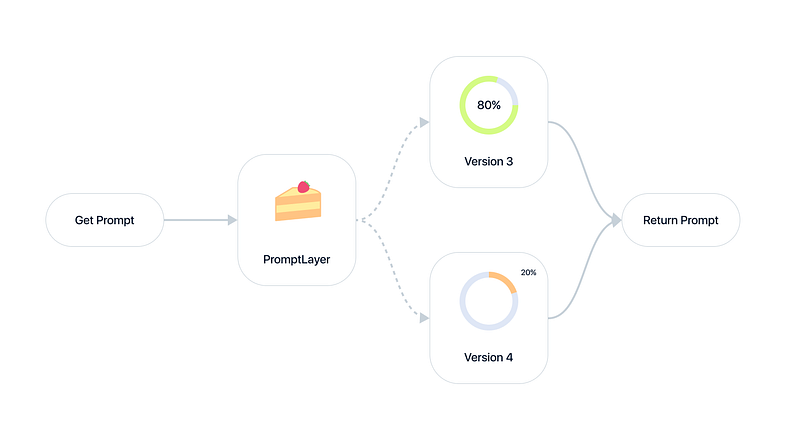
If you ship LLM-powered features, prompt testing is how you find out whether a change actually helps your users before it reaches all of them. The most reliable form of prompt testing is A/B testing: run two prompt versions side by side on real traffic and let user behavior decide the winner.
Prompt engineering keeps returning to one question: do my prompts work well? As more teams push agents and multi-step chains into production, a wrong guess quietly costs real money and user trust. A/B testing your prompts answers that question with evidence rather than a hunch.
What is prompt testing? Prompt testing is the practice of measuring how well a prompt performs before and after a change, so you can ship improvements safely. It spans offline checks against a dataset and online A/B tests against live user metrics, all aimed at proving that a new prompt version genuinely outperforms the one it replaces.
Why ground truth is the hard part
Creating good evals for AI outputs is hard because they usually need ground truth, which is often subjective or does not exist. For instance:
- What defines an optimal summary?
- What counts as a friendly message?
The fix is to anchor your ground truth to user metrics. That is how you build reliable evals for subjective tasks, and it is the reason A/B testing carries so much weight in prompt testing. If you want a deeper primer on this, our guide on what prompt evaluations are and how to evaluate LLM prompts beyond simple use cases both go further than we can here.
Real-world metrics as ground truth
Historical backtesting has limits, so focus instead on real outcome metrics such as:
- Whether the user kept the generated summary or discarded it
- How quickly they abandoned the tab
- Whether the support ticket was actually resolved
- How often they hit regenerate
Because these signals reflect what happened in production, they carry more weight than a subjective rubric.
Prompt testing methods compared
A/B testing is not the only tool. Most teams combine a few methods across the release cycle. Here is how the main prompt testing approaches compare:
| Method | What it measures | Best for | Watch out for |
|---|---|---|---|
| A/B testing (online) | Real user behavior on live traffic | Proving a change actually helps users | Needs traffic volume and time to reach significance |
| Offline evaluation | Prompt output against a fixed dataset | Fast pre-ship checks in CI | Ground truth is often subjective or stale |
| LLM-as-a-judge | Model-graded quality at scale | Scoring open-ended outputs cheaply | Judge bias, needs calibration against humans |
| Backtesting / regression | New prompt against historical inputs | Catching regressions before rollout | Past inputs may not reflect future traffic |
A dependable pattern is to gate every prompt change with offline evaluation in CI, then confirm the winner with an online A/B test on live users. Offline catches obvious regressions cheaply; the A/B test proves the change moves the metric that matters.
How to A/B test your prompts
Running a prompt A/B test comes down to five moves:
- Start small. Roll the new prompt version out to a small slice of users, like 5 to 10% or just your free-tier customers. This caps the risk while still giving you real data.
- Ramp up gradually. Watch user metrics as you raise the rollout. Aim for milestones like 10%, 20%, 40%, and eventually 100%, and watch for any red flags on the way.
- Segment users. Not all users are the same. Segment by user type (free vs paid), user ID, or company so you can test new versions on specific groups before a full rollout.
- Combine methods. A/B testing is powerful, but do not stop there. Pair it with online evals and rigorous offline testing for a full picture of prompt performance.
- Iterate and refine. Prompt testing is ongoing. Analyze the results, tweak the prompt, and run the test again. Continuous iteration is how you dial in a top prompt.
Keeping each version labeled and traceable through prompt versioning makes this loop safe: you can roll a variant back the moment its metrics slip, without touching your deploy pipeline.
Implementing A/B testing with PromptLayer
PromptLayer has full support for A/B testing using dynamic release labels. Dynamic release labels let you overload release labels and route traffic to different prompt versions by percentage or user segment, all without a redeploy. If you are still choosing where prompt testing lives in your stack, our field guide to the best prompt management tools in 2026 lays out the options.
Create a new prompt version. Edit your prompt and try something new. Maybe test a new open source model against your current one.
Set up an A/B release.
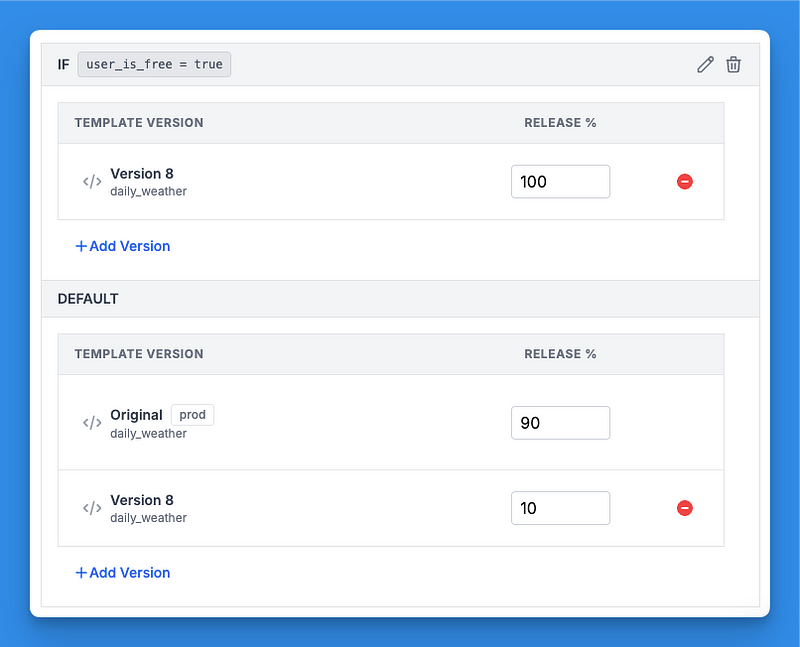
Navigate to the A/B Releases registry in PromptLayer. Create a new A/B release and select the release label you want to overload (for example, "prod"). Choose the base prompt version and the version or versions you want to test.
Set traffic percentages for each version so they add up to 100%. For example, send 90% to v3 (stable) and 10% to v4 (new).
You can also add user segments to define which version each segment receives. Segments use request metadata, like user ID or company. You could, for instance, give internal employees v4 (dev) 50% of the time.
Once everything is configured, save the A/B release. It will now route traffic dynamically for that label.
Launch and monitor.
Start the test and keep a close eye on your key metrics. PromptLayer's analytics dashboard makes it easy to track performance and compare versions side by side.
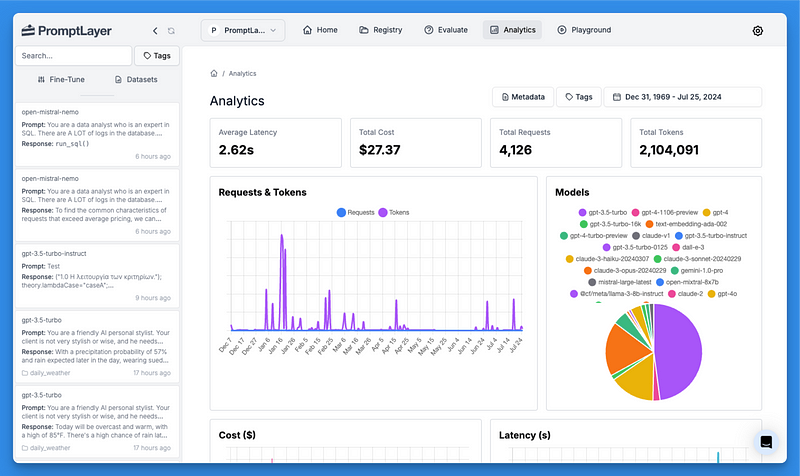
Because PromptLayer controls version routing at the label level, you can widen a winning test, pause a bad one, or hold a version back from a specific segment without shipping code.
Prompt testing FAQ
What is prompt testing?
Prompt testing is measuring how a prompt performs before and after a change so you can ship improvements safely. It covers offline evaluation against a dataset and online A/B testing against live user metrics.
How is prompt testing different from prompt evaluation?
Evaluation scores a single prompt against some standard. Testing compares versions to decide which one to ship. In practice you use prompt evaluations as the scoring mechanism inside a test.
How do you A/B test a prompt?
Roll a new prompt version out to a small percentage of traffic, compare user metrics against the current version, then ramp the winner up gradually. In PromptLayer this is handled by dynamic release labels, so no redeploy is needed.
What metrics should you use for prompt testing?
Anchor to real user outcomes: did the user save the result, resolve the ticket, or click regenerate? These beat subjective rubrics because they reflect what the prompt actually did in production.
How much traffic do you need to A/B test prompts?
Enough to reach a stable signal on your target metric. Start at 5 to 10% of users or your free tier, watch for red flags, and only ramp up once the new version holds.
Ready to A/B test your prompts with confidence? Create a free PromptLayer account and set up your first A/B release in minutes.
PromptLayer is the most popular platform for prompt engineering, management, and evaluation. Teams use PromptLayer to build AI applications with domain knowledge.
Made in NYC. Sign up for free at www.promptlayer.com.